
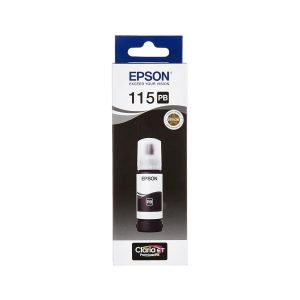
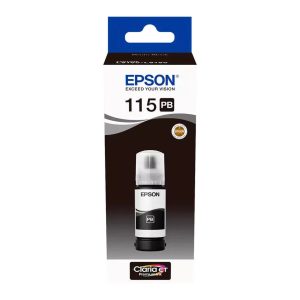
Epson 115 black ink is a genuine 70ml black refill bottle listed for the Epson EcoTank L8160 and L8180 printers. It is designed to refill the black ink tank and has a keyed, spill-resistant nozzle. Buy Epson 115 black ink from Realmer Technology in Kenya, with countrywide delivery available. Confirm today’s price, stock and delivery details with us before ordering.
Epson 115 black ink: key features
This refill is intended for compatible EcoTank printers that use the Epson 115 ink series. Its keyed nozzle is designed to fit the matching black tank, helping reduce spills and colour mix-ups during refilling. Always check the model printed on your printer and the information on the bottle before you buy, because ink bottles for different printer series may not be interchangeable.
- Genuine Epson 115 Black ink in a 70ml bottle.
- Listed yield of up to 6,200 pages; actual results vary with print coverage and use.
- Keyed nozzle designed for the black ink tank.
- Refill-tank design lets you top up the tank instead of replacing a small cartridge.
Printer compatibility and part number
This Epson 115 black ink bottle is listed as compatible with the Epson EcoTank L8160 and L8180. It may not fit other EcoTank models. If you have a different printer, do not rely on the EcoTank name alone: confirm the specific ink series in your printer manual, on the existing bottle, or with Epson support.
The listed part number is C13T07C14A. Compare it with the code on the bottle you are replacing and check the printer model before opening a new refill. If the bottle label or your printer’s instructions differ from these listing details, follow the manufacturer information for your exact model. You can contact Realmer with your printer model if you would like us to check compatibility before purchase.
How many pages does Epson 115 black ink print?
The listed page yield for this 70ml bottle is up to 6,200 pages. This is an estimate rather than a guaranteed count. A page with large areas of dark graphics uses more ink than a page with a few lines of text. Print settings, cleaning cycles, document coverage and how often the printer is used can also affect the number of pages between refills.
For a home office or small business, an ink tank can be convenient for regular printing because you refill the built-in tank when needed. Check the printer’s ink-level display and use the correct colour bottle for each tank. Do not mix different ink types or assume that a bottle for another Epson series will work.
How to refill an EcoTank with Epson 115 black ink
- Check that your printer is an EcoTank L8160 or L8180 and that you have the black bottle.
- Switch on the printer, open the ink-tank cover and locate the black tank.
- Open the tank cap and prepare the bottle following its label and your printer instructions.
- Keep the bottle upright and fit its nozzle to the matching tank inlet. Let the ink flow as designed; do not squeeze or force the bottle.
- When the tank reaches its fill line or the bottle stops as designed, remove it carefully, close the tank cap and shut the cover.
Keep ink away from clothing and work surfaces, and clean any drips promptly. Never force a bottle into a tank or pour black ink into a colour tank. If the nozzle does not fit, stop and check the model and bottle code before continuing. Follow the supplied instructions if they differ from these general steps.
Storage tips
Keep the bottle upright, capped and in a cool, dry place away from direct sunlight. Store it out of reach of children. Before ordering a replacement, check the colour, 70ml volume, part number and printer compatibility. These quick checks can help you avoid choosing the wrong refill and keep your printer ready for its next job.
Frequently asked questions
Is this original Epson ink?
This listing is for genuine Epson 115 Black ink. Check the packaging, label and part number when your order arrives.
How many pages can I print with one bottle?
The listed yield is up to 6,200 pages. Your actual yield depends on document coverage, printer settings and use.
Does Realmer deliver outside Nairobi?
Countrywide delivery is available. Contact Realmer to confirm delivery arrangements for your location.
Can I pay by M-Pesa or pay on delivery?
Both options are noted in the existing listing. Confirm which payment methods are currently available when placing your order.
Order Epson 115 black ink in Kenya
Need Epson 115 black ink for an EcoTank L8160 or L8180? Contact Realmer Technology to check current availability, price, payment and delivery before ordering. Browse our printer range or read our guide to choosing a printer for your office in Kenya. For manufacturer guidance, visit Epson support.

